


How to Create a Professional Branded Invoice for Your Business
Your invoice is often the last thing a client sees before they pay you, and the first thing they think of when they consider hiring you again. A poorly formatted invoice with no branding, inconsistent numbering, and missing details does not just look unprofessional. It can delay payment, create confusion at tax time, and quietly undermine the credibility you have worked hard to build with your clients.
Creating a professional branded invoice does not require a designer or expensive software. It requires knowing what to include, how to present it, and using the right tools to make the process repeatable without starting from scratch every time.
This guide walks through exactly how to do that.
What makes an invoice professional
A professional invoice is not just about aesthetics, though presentation matters. It is about completeness, consistency, and clarity. A client receiving your invoice should immediately know who it is from, what they are being charged for, how much they owe, and how to pay.
Professional invoices share a few common characteristics:
- They include all legally required information for UK businesses
- They use consistent numbering so both parties can reference them easily
- They are clearly branded with the business name and logo
- They state payment terms and due dates explicitly
- They make it easy for the client to pay
If your current invoices are missing any of these, this guide will help you fix that.
Step 1: Set up your business branding on your invoices
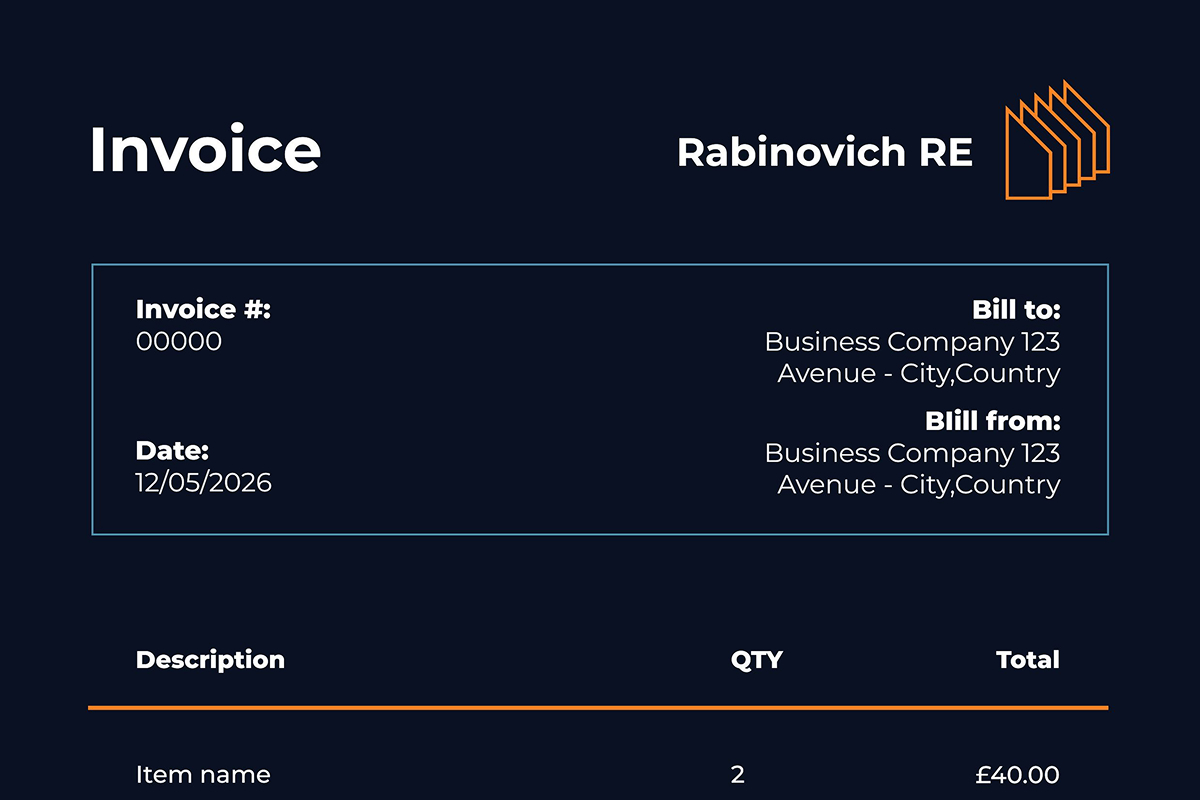
Your invoice should be immediately recognisable as coming from your business. That means your logo, your business name, and your contact details are prominently displayed, typically at the top of the invoice.
If you have a logo: Upload it to your invoicing software once, and it will appear on every invoice automatically. A high-resolution PNG or JPG works best for clean rendering on both screen and PDF.
If you do not have a logo yet, A clean text-based header with your business name in a professional font works perfectly well. Many established businesses use text-only invoice headers. What matters is consistency; every invoice should look like it came from the same business.
Your branding block should include:
- Business name
- Business address
- Contact email
- Phone number (optional but useful)
- Website (optional)
- VAT registration number (if VAT-registered)
BuiltForSmallBusiness.com stores your business details once and applies them to every invoice automatically, including your logo or a clean text fallback if no logo has been uploaded. Set up your profile here.
Step 2: Include all legally required information
A UK invoice that is missing required information is not just unprofessional — it can cause problems with HMRC and give clients a reason to delay payment while they request corrections.
Every UK invoice must include:
- Your business name and address
- Your client's name and address
- A unique invoice number
- The invoice date
- The payment due date
- A description of the goods or services provided
- The subtotal (excluding VAT)
- The VAT rate and amount (if VAT-registered)
- The total amount due
- Your VAT registration number (if applicable)
For sole traders, your legal name must appear on the invoice even if you trade under a different business name. If your name is James Brown but you trade as JB Creative, the invoice should show both.
Good invoicing software handles this automatically; you enter your details once during setup, and they appear correctly formatted on every invoice you send.
Step 3: Use a consistent invoice numbering system
Invoice numbers serve two purposes: they make it easy to reference a specific invoice in conversation with a client, and they are required for HMRC compliance. Every invoice must have a unique number.
The most common formats are:
- Sequential — INV-001, INV-002, INV-003
- Date-based — INV-2026-001, INV-2026-002
- Client-based — ACME-001, ACME-002 (useful if you have a small number of regular clients)
Whatever format you choose, stick to it. Gaps in your invoice number sequence, jumping from INV-045 to INV-050, can raise questions during a tax investigation, even if there is an innocent explanation.
Invoicing software generates and increments invoice numbers automatically, so you never have to think about this.
Step 4: Write clear line items with accurate descriptions
The body of your invoice, the line items, is where clarity really matters. Vague descriptions like services rendered or work completed create friction. Clients who are not sure what they are paying for are slower to approve payment, more likely to query the invoice, and harder to chase if they do not pay on time.
Good line item descriptions are specific:
- "Website design, 3-page brochure site (March 2026)" ✅
- "Consulting, 4 hours at £85/hour, strategy session 14 March 2026" ✅
- "Services" ❌
- "Monthly retainer" without further detail ❌
Each line item should include a description, quantity, unit price, and line total. If you are applying different VAT rates to different items, for example, some items are zero-rated, each line should show the applicable rate.
Step 5: State your payment terms clearly
Payment terms are one of the most commonly overlooked parts of an invoice, and one of the most important. Ambiguous payment terms are a leading cause of late payment for UK small businesses.
Do not just write Net 30 or "payment on receipt." State the actual calendar due date:
"Payment due by 30 June 2026"
This removes any ambiguity about when payment is expected and creates a clear deadline both parties can reference. If a client queries a late payment chase, you can point to the due date on the invoice rather than arguing about what Net 30 means from a specific send date.
Standard payment terms for UK small businesses:
- Net 7 — common for smaller invoices and trusted regular clients
- Net 14 — good default for most freelance and service work
- Net 30 — standard for larger clients with formal procurement processes
Whatever you agree with a client, be consistent and state it on every invoice.
Step 6: Make it easy to pay
The easier you make it for a client to pay, the faster they will. An invoice that requires the client to log into their banking app, set you up as a new payee, enter a reference, and wait for bank processing introduces friction at exactly the wrong moment.
Adding an online payment link to your invoice removes most of that friction. A client who can click "Pay Now" and enter their card details in 30 seconds is significantly more likely to pay immediately than one who has to take multiple manual steps.
BFSB's invoicing feature includes Stripe payment links on every invoice. Your client clicks the link, pays by card, and the payment is confirmed instantly. You are notified that the invoice is marked as paid, and the money is on its way to your account.
For clients who prefer bank transfer, include your sort code and account number in the invoice as well. Offering both options covers all preferences.
Step 7: Add a professional note or thank you
A short, professional note at the bottom of your invoice is a small touch that makes a real difference to how your invoice is received. It does not need to be long:
"Thank you for your business. If you have any questions about this invoice, please do not hesitate to get in touch."
It humanises the transaction, reinforces the relationship, and subtly signals that you are a professional who takes client communication seriously. Clients who feel valued pay faster and come back more often.
What a branded invoice does for your business beyond getting paid
A professional branded invoice does more than get you paid on time. Every invoice you send is a piece of marketing. It reinforces your brand, your professionalism, and your attention to detail with every client, every time.
For a small business or sole trader, this matters more than it might seem. Your clients often judge the quality of your work partly by the quality of your admin. An invoice that looks sharp, arrives promptly, and is easy to pay sends a signal about the kind of business you run. Contrast that with a Word document invoice, inconsistently numbered, with your logo pasted in at a low resolution and no payment link, and the difference in perception is significant even if the work itself is identical.
For more on getting paid faster, see our post on How to Send an Invoice Online and Get Paid Faster.
Creating branded invoices with BuiltForSmallBusiness.com
BuiltForSmallBusiness.com handles everything in this guide automatically:
- Your logo or text falls back on every invoice
- All required UK invoice fields pre-populated
- Automatic sequential invoice numbering
- Stripe payment links built in
- PDF export for your records
- VAT calculation if you are VAT-registered
- Client portal so clients can view and pay all their invoices in one place
It is completely free to get started, no credit card required. Create your first branded invoice here.
FAQ: Professional branded invoices for UK businesses
Do I need a logo to create a professional invoice? No — a clean text-based header with your business name works perfectly well. What matters is consistency and completeness, not graphic design.
What font or colour scheme should I use on my invoices? Match your existing brand if you have one. If you are starting from scratch, keep it simple: a clean sans-serif font, your brand colour for headings, and plenty of white space. Avoid cluttered layouts.
Can I use the same invoice template for UK and international clients? Yes, with minor adjustments. For international clients, you may need to note that VAT does not apply (if they are outside the UK), clearly state the currency, and potentially adjust payment methods. Good invoicing software handles this automatically based on client location.
How do I handle invoice corrections? Never delete or overwrite an invoice that has been sent. Instead, issue a credit note to cancel the original and raise a new invoice with the correct details. This maintains a clean audit trail for HMRC.
Is it free to create branded invoices with BuiltForSmallBusiness.com? Yes, branded invoicing with your logo, Stripe payments, and PDF export are included in the free Foundation plan. Get started here.
Related articles you might like

Tag:
UK InvoicingShare:
