


You Can Now Import Your Historical Expenses into BFSB
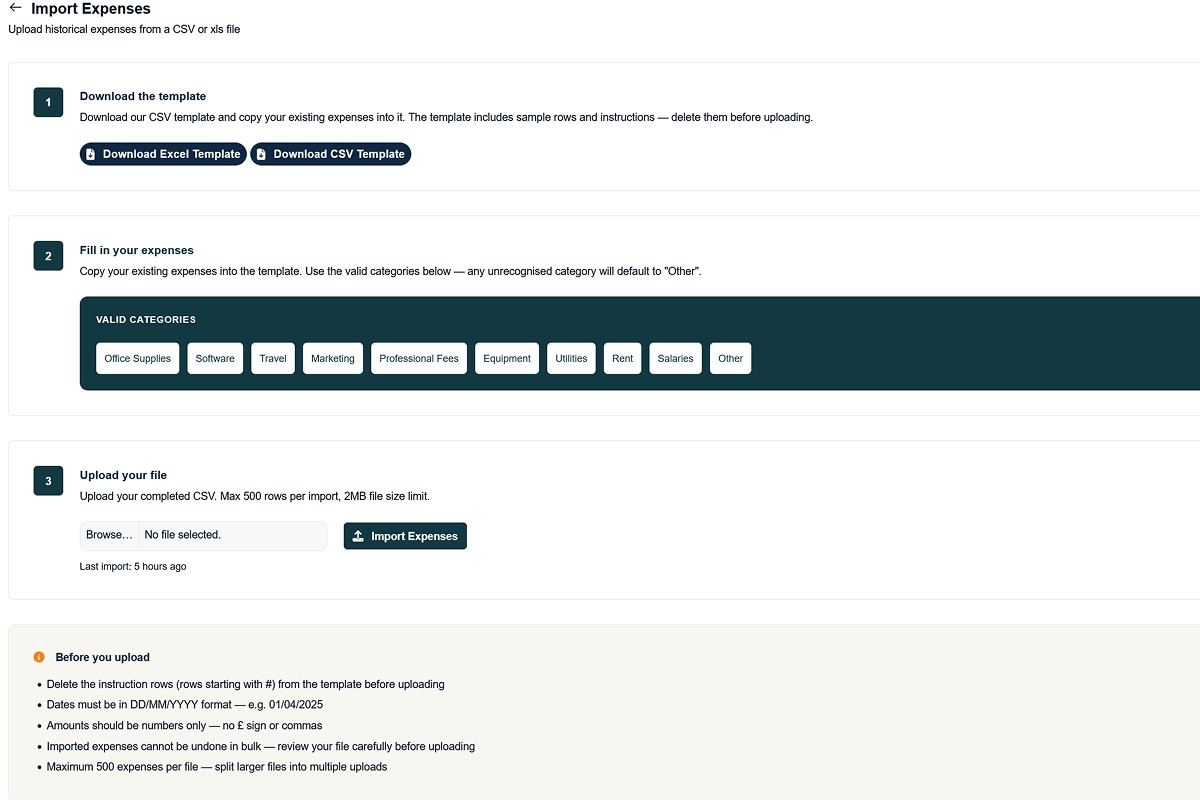
If you have been running your business for a while and keeping expenses in a spreadsheet, you no longer need to re-enter them manually. Built For Small Business now supports bulk expense imports. Upload your historical expenses as a CSV or Excel file, and they will appear in your account within minutes.
Why we built this
One of the most common pieces of feedback we received from new users was simple: they already had years of expense records in spreadsheets, and the idea of typing each one individually was a dealbreaker.
That is a fair point. A sole trader with three or four years of business expenses might have hundreds of rows of data. We should not be asking you to type all of that in by hand.
The import feature removes that barrier entirely. Bring your existing records into BFSB once, and from then on, you can log expenses as you go.
How it works
Step 1: Download the template
Go to Expenses → Import and download the template in Excel or CSV format. The template has seven columns:
- Title
- Category
- Date
- Amount
- Payment Method
- Description
- Recurring
Sample rows are included so you can see the expected format before filling in your own data.
Step 2: Fill in your expenses
Copy your existing expenses into the template. Categories are mapped to HMRC's allowable expense categories automatically. So even if your category names are slightly different, the system will match them where possible and default to "Other" for anything it cannot recognise.
Dates can be entered in DD/MM/YYYY format. The Excel template handles date formatting automatically, so you do not need to worry about Excel converting your dates to serial numbers.
Step 3: Upload
Upload your completed file. The import runs in the background, so you do not need to wait on the page; your expenses will appear in your account within a few minutes.
What happens to your data
Every imported expense gets a unique reference number starting with IMP- so you can tell at a glance which expenses came from an import versus ones logged manually. All the usual expense features work on imported expenses; you can edit them, attach receipts, filter by tax year, and include them in your shared accountant reports.
Free and Business plan access
Free plan users get one bulk import included. That is designed for onboarding, bringing your historical records in when you first join BFSB.
Business plan users get unlimited imports. If you manage multiple years of records or need to import regularly, the Business plan covers that.
A few things to know before importing
- Maximum 500 expenses per file, split larger files into multiple uploads
- Amounts should be numbers only, no £ sign or commas
- Dates in DD/MM/YYYY format for CSV uploads
- The Excel template handles date formatting automatically
- Imported expenses cannot be undone in bulk. Review your file before uploading
Get started
Head to Expenses → Import into your BFSB account to download the template and start importing.
If you do not have an account yet, create one free here, no credit card required.
Related articles you might like


Tag:
AnnouncementShare:
